This article will focus on configuring a cookiecutter-django project with Docker and Amazon RDS. By default when selecting deployment with Docker, a service with PostgreSQL will be used as the database. This is great for local development, but for production, we may want Amazon to handle the database.
Update: These series of articles were created with cookiecutter-django tagged at 1.10.7. I recommend installing it like:
cookiecutter -c 1.10.7 https://github.com/pydanny/cookiecutter-djangoor use whatever version is tagged as the latest.
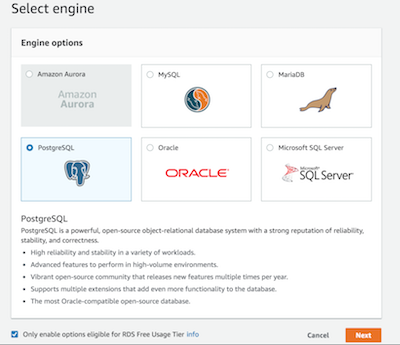
Setting up an Amazon RDS instance is easy, we’ll be guided through three steps. First, select your engine. We’re going to pick PostgreSQL.
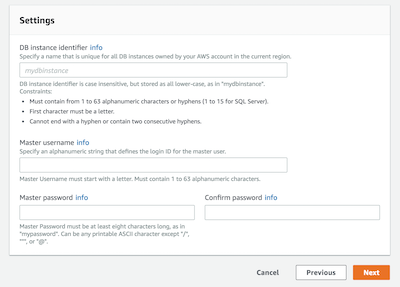
Second, set up your database instance identifier, master username, and master password.
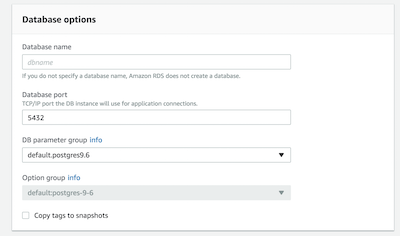
Finally, database options. I disabled Public Accessibility and made sure I had the correct VPC and Availability Zone. You’ll also be prompted for the database name. Note, cookiecutter-django uses the same variable for database username and database name, so you may want to use the same. However, in this tutorial, we get rid of this by assigning the database name a variable of its own.
Next we’ll modify a couple of files, compose/production/django/entrypoint.sh, production.yml, and local.yml.
compose/production/django/entrypoint.sh
Replace the following line
export DATABASE_URL=postgres://$POSTGRES_USER:$POSTGRES_PASSWORD@postgres:5432/$POSTGRES_USERwith
export DATABASE_URL=postgres://$POSTGRES_USER:$POSTGRES_PASSWORD@$POSTGRES_HOST:5432/$POSTGRES_DB_NAMEand
conn = psycopg2.connect(dbname="$POSTGRES_USER", user="$POSTGRES_USER", password="$POSTGRES_PASSWORD", host="postgres")with
conn = psycopg2.connect(dbname="$POSTGRES_DB_NAME", user="$POSTGRES_USER", password="$POSTGRES_PASSWORD", host="$POSTGRES_HOST")This adds more flexibility to the database settings by being able to set up a database name and a different host in case we don’t want to use the postgres Docker service.
local.yml
For both django and postgres services, we’ll need to update the environment variables:
    environment:
      - POSTGRES_USER=username
      - POSTGRES_HOST=postgres
      - POSTGRES_DB_NAME=database
production.yml
From volumes, we’ll remove the following lines:
  postgres_data: {}
  postgres_backup: {}
We’ll also remove the entire postgres service:
  postgres:
    build:
      context: .
      dockerfile: ./compose/production/postgres/Dockerfile
    volumes:
      - postgres_data:/var/lib/postgresql/data
      - postgres_backup:/backups
    env_file: .env
Finally, we’ll remove postgres from the django service dependencies:
    depends_on:
      - postgres
      - redis
The new database settings can be configured via the .env file for production:
POSTGRES_PASSWORD=password
POSTGRES_USER=username
POSTGRES_DB_NAME=database
POSTGRES_HOST=somehost.rds.amazonaws.com
So that should be it. The next articles will be about replacing Caddy with a solution based on Nginx, Amazon Route 53, and Elastic Load Balancing. Stay tuned!